Gateways
Thing Tables.Represents an IoT Gateway, the entry-point for IoT messages and a container for Connectors and Rules-Engine processing.
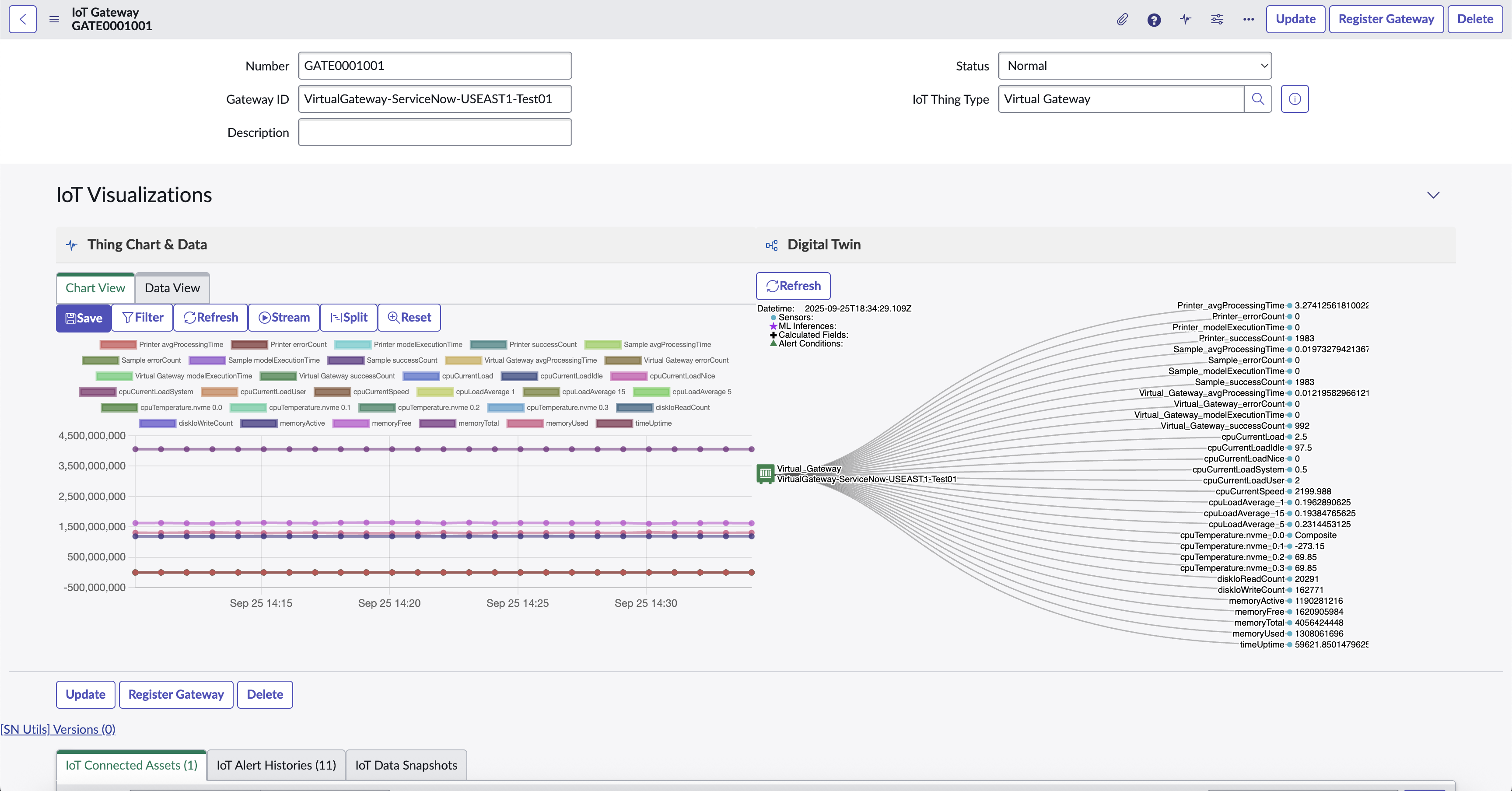
Sample Gateway
Gateway Registration
Gateways can be created in ServiceNow, and then registered with the IoT Cloud using either the Register UI Action or UX Action with the same name. The Gateway Id and Gateway Type will need to be specified.
Gateway Chart and Digital Twin
The IoT Gateway can also display the Thing Chart and Digital Twin components.
Like any other Thing, the IoT Gateway sends Telemetry (time-series) data at a regular interval and can be configured with Calculated Fields and Alert Conditions in it’s corresponding Thing Type. The Sensors are mostly focused on the performance of the device hosting the Gateway & Rules-Engine.
Alarms and Metrics
We’ve added more intelligent monitoring of our Gateways, including:
- Gateway Alarms: Central monitoring of important runtime problems and warnings from Gateways and their connected Things.
- Gateway Metrics: The Telemetry data sent by the Gateways now includes key metrics for each Thing Type being processed.
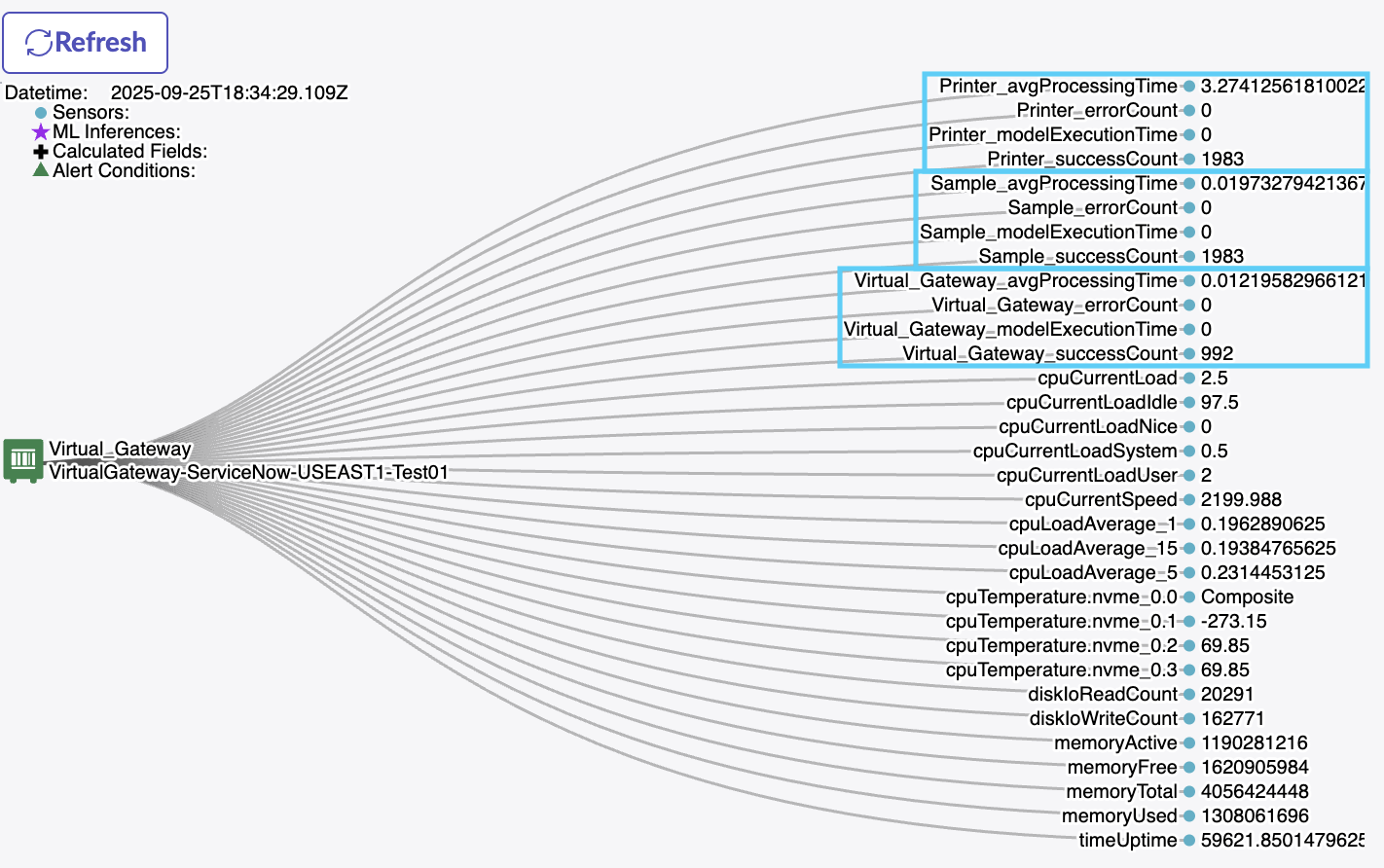
Gateway Metrics
Gateway Command Console
The Command Console tab on an IoT Gateway allows you to send/receive messages (IoT Commands) to the Gateway. The following catalog of out-of-the-box Command Templates is currently available:
- Clear Registration Cache
- Get Connector Status
- Get Device Cache (Thing)
- Get I/O Status
- Get Registration Cache (All)
- Get Registration Cache (Thing)
- Get ThingType Cache
- Restart Virtual Gateway
- Test Thing Data
- Reset ThingType Cache: Forces the Gateway Rules Engine to reload the ThingType
- Reset Registration Cache: Forces the Gateway Rules Engine to reload the Gateway’s & Thing’s Registration and Integrations
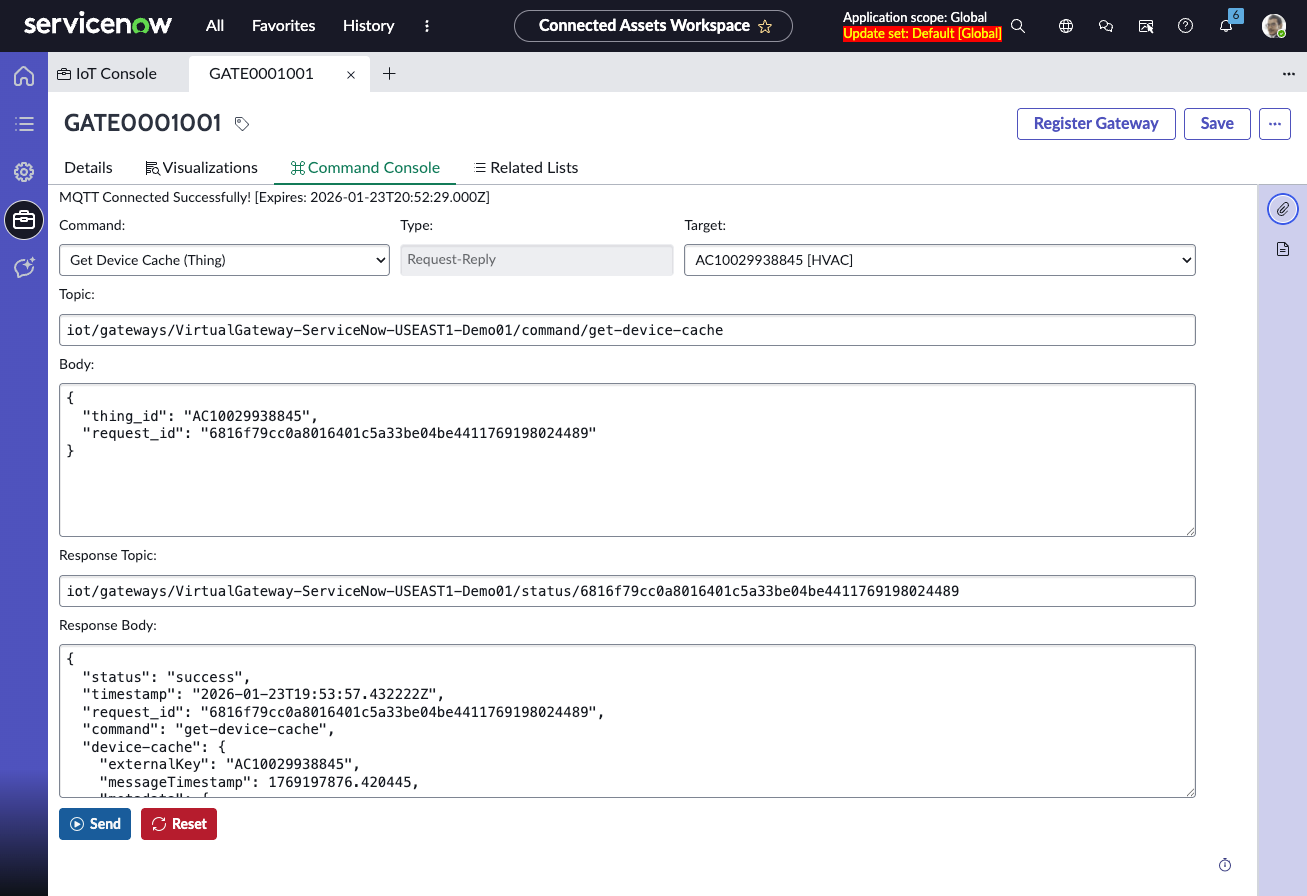
Gateway Command Console
Custom Commands
Select the CUSTOM command to use a freeform editor to send any custom command message to the Gateway.
Restart Gateway
-
Description: It restarts a gateway. It does not apply to an asset.
-
Type: Request-Reply
-
Topic:
// topic pattern: iot/gateway/+/command/+ iot/gateway/{gateway_id}/command/{command_name} // example iot/gateways/VirtualGateway-PLAATO-USEAST1-DEV-01/command/restart -
Body
// example
{
  "request_id": "ppate1690571776080"
}
Get Registeration Cache (All)
-
Description: It retrieves registeration caches of all assets and gateways
-
Type: Request-Reply
-
Topic:
// topic pattern: iot/gateway/+/command/+ iot/gateway/{gateway_id}/command/{command_name} // example iot/gateways/VirtualGateway-PLAATO-USEAST1-DEV-01/command/get-thing-cache -
Body
{
  "request_id": "ppate1690571863558"
}
Get Registeration Cache (Thing)
-
Description: It retrieves registeration cache of a specific thing. A thing could be gateway or asset.
-
Type: Request-Reply
-
Topic:
// topic pattern: iot/gateway/+/command/+ iot/gateway/{gateway_id}/command/{command_name} // example iot/gateways/VirtualGateway-PLAATO-USEAST1-DEV-01/command/get-cache-thingid -
Body
{
  "thing_id": "{thing_id}", // e.g., 10P-KEG01, VirtualGateway-PLAATO-USEAST1-DEV-01
  "request_id": "ppate1690572125580"
}
Clear Registeration Cache
-
Description: It clears registeration cache of a thing. A thing could be gateway or asset.
-
Type: Request-Reply
-
Topic:
// topic pattern: iot/gateway/+/command/+ iot/gateway/{gateway_id}/command/{command_name} // example iot/gateways/VirtualGateway-PLAATO-USEAST1-DEV-01/command/clear-cache -
Body
{
  "thing_id": "{thing_id}", //e.g., VirtualGateway-PLAATO-USEAST1-DEV-01, 10P-KEG01
  "request_id": "ppate1690572498198"
}
Get ThingType Cache
-
Description: It retrieves specification cache of a thing type.
-
Type: Request-Reply
-
Topic:
// topic pattern: iot/gateway/+/command/+ iot/gateway/{gateway_id}/command/{command_name} // example iot/gateways/VirtualGateway-PLAATO-USEAST1-DEV-01/command/get-spec-cache -
Body
{
  "thing_type": "{thing_type}", //e.g., Brewing_Keg, Virtual_Gateway_PLAATO
  "request_id": "ppate1690572761850"
}
Get IO Status
-
Description: It retrieves status of various IOs.
-
Type: Request-Reply
-
Topic:
// topic pattern: iot/gateway/+/command/+ iot/gateway/{gateway_id}/command/{command_name} // example iot/gateways/VirtualGateway-PLAATO-USEAST1-DEV-01/command/get-io-status -
Body
// example
{
  "request_id": "ppate1690573052355"
}
Get Connector Status
- Description: It retrieves status of all connectors attached to a gateway.
- Type: Request-Reply
- Topic:
  // topic pattern:
  iot/gateway/+/command/+
  iot/gateway/{gateway_id}/command/{command_name}

  //  example
  iot/gateways/VirtualGateway-PLAATO-USEAST1-DEV-01/command/get-connector-status
- Body
//example
{
  "request_id": "ppate1690573316704"
}
Get Device Cache
- Description: It retrieves cache of a device data
- Type : Request-Reply
- Topic:
  // topic pattern:
  iot/gateway/+/command/+
  iot/gateway/{gateway_id}/command/{command_name}

  //  example
  iot/gateways/VirtualGateway-PLAATO-USEAST1-DEV-01/command/get-device-cache
- Body
// example
  {
    "thing_id": {thing_id},
    "request_id": "ppate1690580697957"
  }
Test thing data
- Description: It lets your test your data. It inputs sample data of an asset/gateway and outputs processed data from rules-engine.
- Type: Request-Reply
- Topic:
// topic pattern:
iot/gateway/+/status/+
iot/gateway/{asset_id}/status/{request_id}

//  example
iot/gateways/VirtualGateway-PLAATO-USEAST1-DEV-01/command/test-thing-data
- Body
// example
{
  "externalKey": "{asset_id}", // e.g., 10P-KEG01
  "request_id": "ppate1690573756372",
  ... // add sensor data
}
Reset Registration Cache
- Description: It resets cache of an asset or an gateway.
- Type: Broadcast
- Topic:
// topic pattern
iot/cache/registration/{asset_id}/invalidate


// example
iot/cache/registration/10P-KEG01/invalidate
- Body
// example
{
  "externalKey": "{asset_id}", //e.g., 10P-KEG01
  "message": "Manual Registry cache reset."
}
Reset ThingType Cache
- Description: It resets cache of thingtype. A thingType could be a gateway or thing
- Type: Broadcast
- Topic:
// topic pattern
iot/cache/specification/{thing_type}/invalidate


// example
iot/cache/specification/Brewing_Keg/invalidate
- Body
// example
{
  "thingType": "{thing_type}", //e.g., Brewing_Keg
  "message": "Manual Registry cache reset."
}
MQTT Template
- Type
- The type of message (Broadcast, Request-Reply). NOTE: In the initial release only
Broadcastis supported. - Topic
- The MQTT Topic to publish the command to
- Body
- The JSON payload of the command
NOTE
This is especially useful if you are using a custom connector. This will allow you to publish a message to the Gateway, which will in-turn publish it to the connector itself. Use the following topic format for Connector commands:iot/gateways/{GATEWAY_ID}/connector/xxx