Alert History
Save Alert History records in Salesforce when IoT Alerts are received.
Bolt Data Connect can be configured to send IoT Alerts from the IoT Cloud to Salesforce when certain conditions or signals are received from the connected Things. These IoT Alerts are Platform Events, and can be processed in real time using Process Builders, Flows or Triggers. If you would like to also save copies of these IoT Alerts in Salesforce, simply enable this setting and Bolt Data Connect will automatically save received IoT Alerts in the “IoT Alert History” Object.
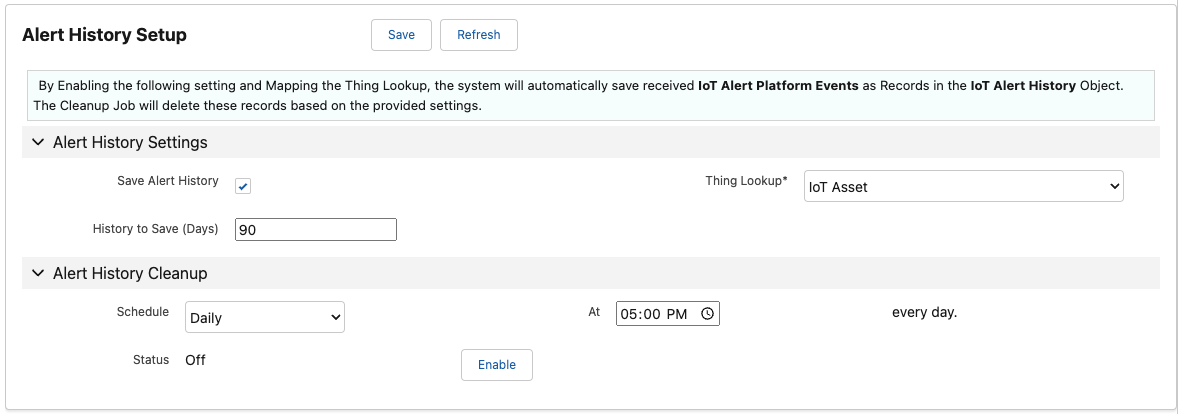
Alert History Setup
Field Definitions
- Save Alert History
- This field enables / disables the creation of “IoT Alert History” records.
- Thing Lookup
- The field on the “IoT Alert History” Object which represents the Lookup to the related Thing Object. (Default should be “IoT Asset”)
- History to Save (Days)
- The number of days of history to save (used by the Cleanup job below).
Alert History Cleanup
The Cleanup Job will delete these “IoT Alert History” records based on the provided “Days” above.
- If an existing schedule has already been configured, select Disable prior to configuring a new schedule.
- In the Schedule drop-down menu, select the desired frequency.
- Enter the appropriate value in the At field
- Hourly: Define how many minutes past the hour to run the sync.
- Daily: Define the time of day.
- Weekly: Define the day of the week and time of day.
- Monthly: Define which day of the month and the time of day.
- Select Enable.
FYI
Thechron expression is shown in the Status field.
Last modified January 28, 2025: Winter 25 Release Notes (018efc7)