Gateways
Thing Objects.Represents an IoT Gateway, the entry-point for IoT messages and a container for Connectors and Rules-Engine processing.
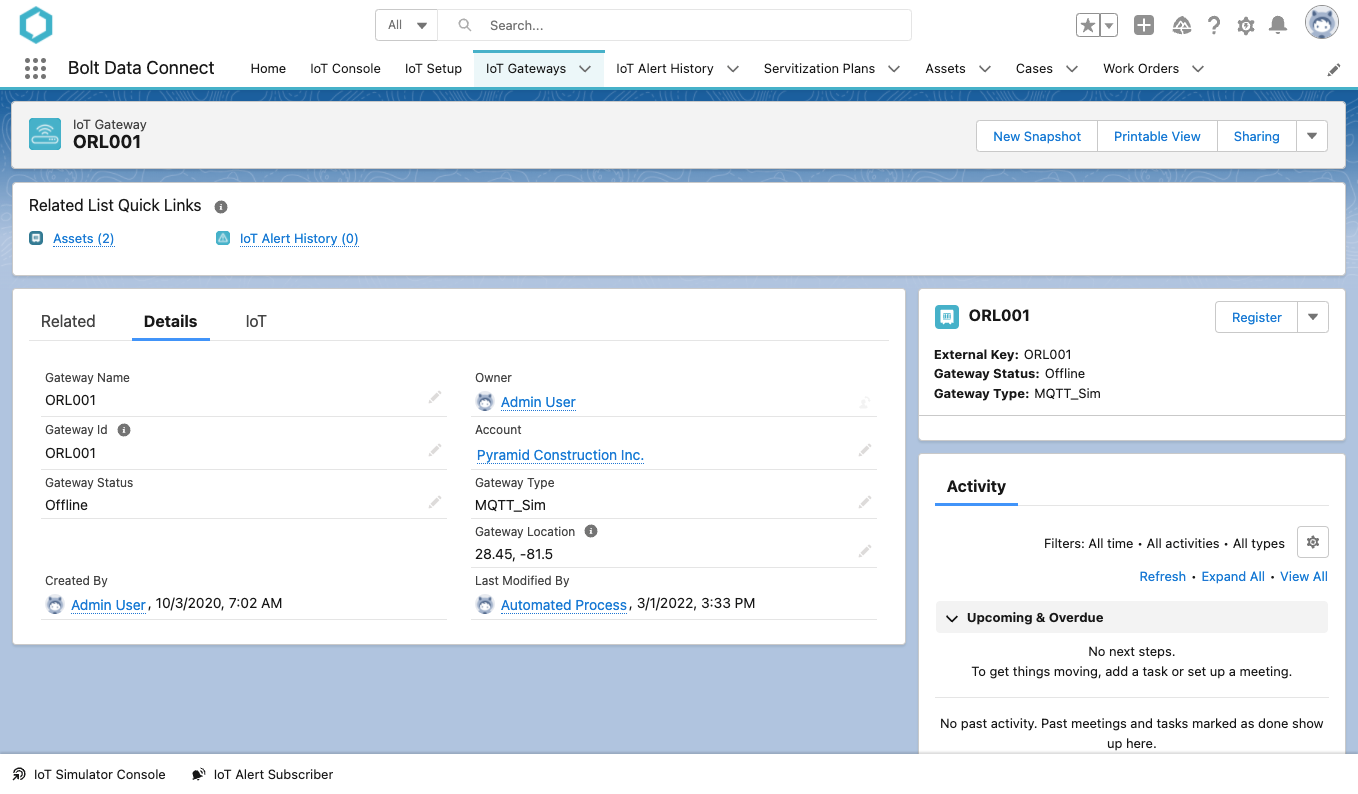
Sample Gateway
Gateway Auto-Registration
As Gateways are registered with the IoT Cloud, an IoT Gateway Alert will be sent and the Gateway will automatically be created. The following fields will be filled in automatically:
- Name
- The Gateway Name will be auto-filled with the
Gateway Id, but it can be overriden. - Gateway Id
- The Unique Gateway Id. This value should not be edited.
- Gateway Type
- The
ThingTypeof the Gateway. This value should not be edited outside of theRegistrationQuick Action. - Gateway Status
- As IoT Gateway Alerts are received, the Gateway Status is automatically updated to match the latest value.
Gateway Manual-Registration
Gateways can also be created in Salesforce, and then registered with the IoT Cloud using the Registration Quick Action. The Gateway Id and Gateway Type will need to be specified, and the IoT components will be auto created and be ready for downloading & setup of the Edge Gateway.
Gateways on the IoT Console
The IoT Console is the centralized dashboard for viewing all IoT Things within an Org. Gateways will be displayed on the Map for all Things matching the current filter, if they have the Geo-Location fields filled in.
The Map now has Clustering in addition to Overlays, allow the user to filter Things, Gateways or both.
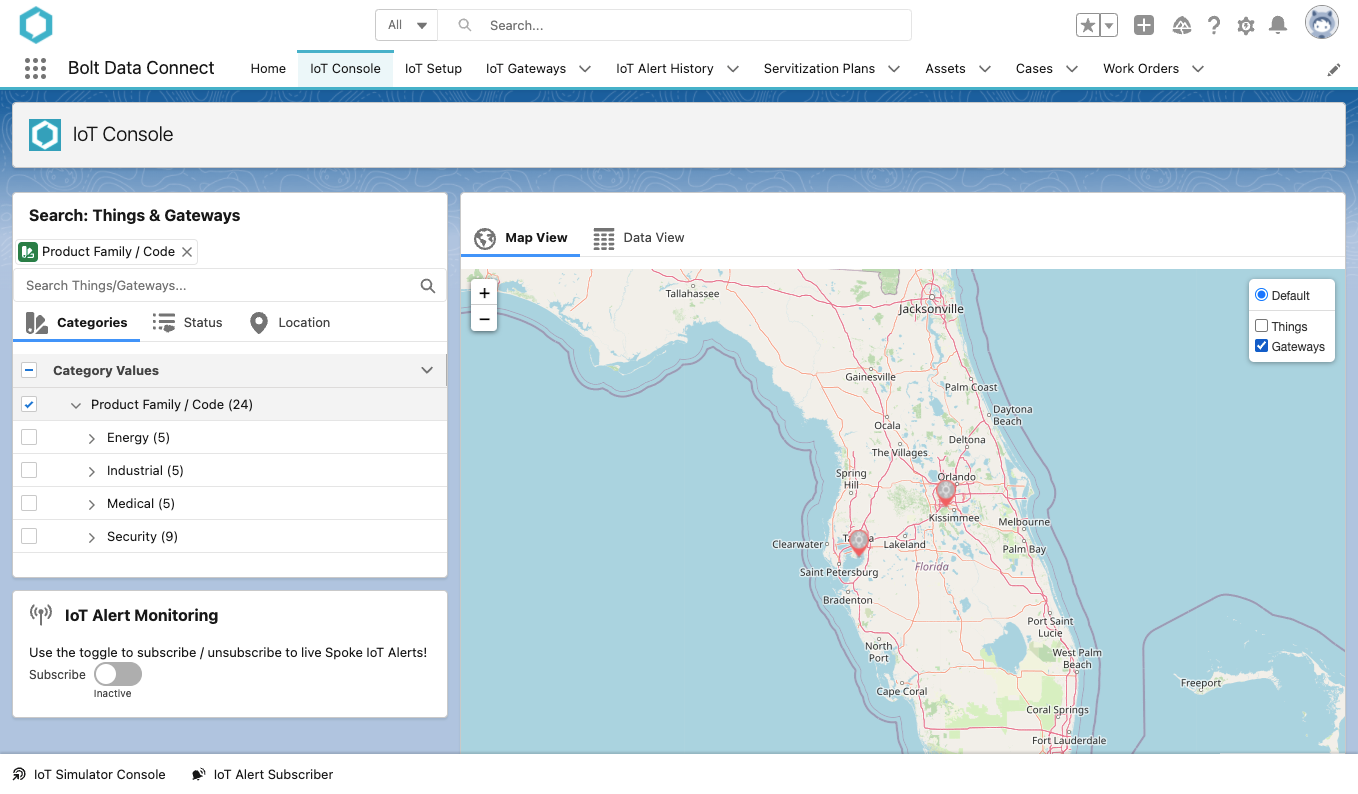
Gateway Maps
Gateway Chart and Digital Twin
The IoT Gateway can also display the Thing Chart and Digital Twin components.
Like any other Thing, the IoT Gateway sends Telemetry (time-series) data at a regular interval and can be configured with Calculated Fields and Alert Conditions in it’s corresponding Thing Type. The Sensors are mostly focused on the performance of the device hosting the Gateway & Rules-Engine.
Alarms and Metrics
We’ve added more intelligent monitoring of our Gateways, including:
- Gateway Alarms: Central monitoring of important runtime problems and warnings from Gateways and their connected Things.
- Gateway Metrics: The Telemetry data sent by the Gateways now includes key metrics for each Thing Type being processed.
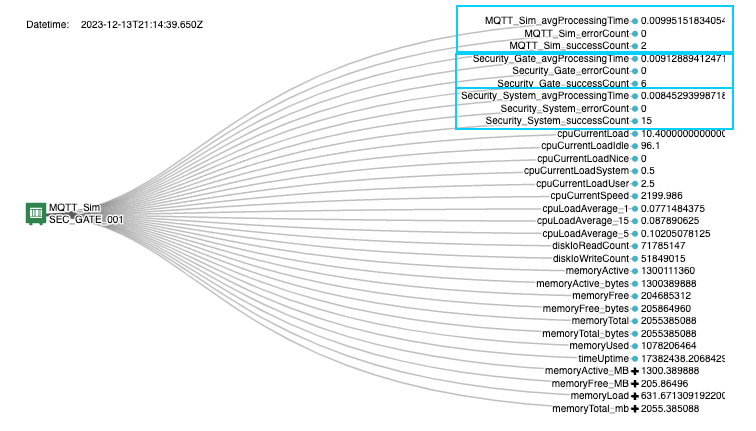
Gateway Metrics
Gateway Integrations Editor
The Gateway Integrations editor provides easy interface for controlling the flow and transformation of messages from Things registered to the Gateway. As IoT messages are received into the Gateway, it will lookup an Integration below to determine the appropriate Connector => Transformer => Stream, or “Integrtion Path”.
Connectors
Connectors are components that can be deployed to a Gateway to integrate to custom API, data-store, or other source for ingestion of IoT messages / data. By default, every IoT Gateway will include an mqtts connector but others can be deployed by contacting support.
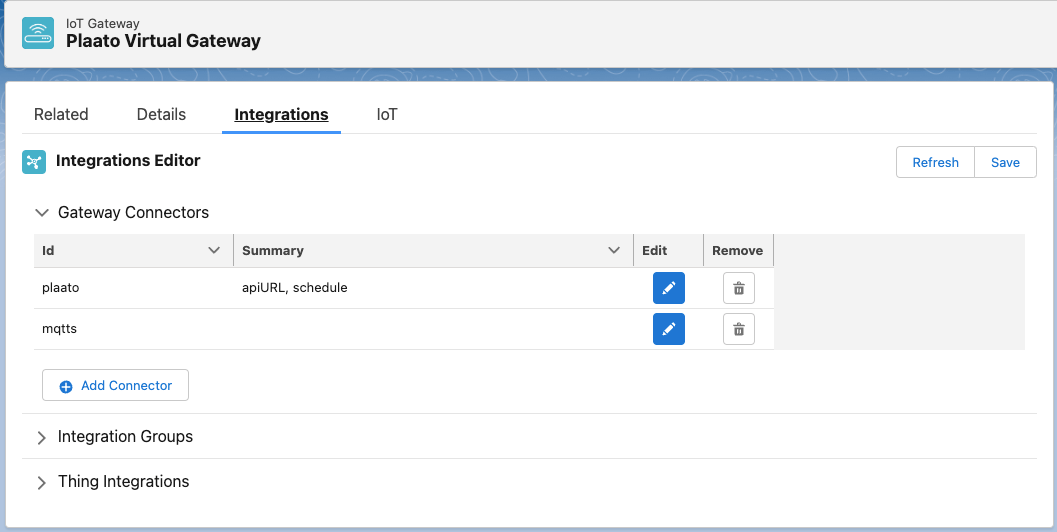
Integration Editor: Connectors
NOTE
You can Add Connectors, and configure the parameters of existing Connectors through this editor but they will not be deployed to the Gateway until you’ve contacted support (see above).Integration Groups
Groups allow you to define the “Integration Path” for all Things of a certain ThingType at once.
Start by selecting the ThingType, or select “*” to setup the Default, and then the desired Connector, Transfomer and Stream.
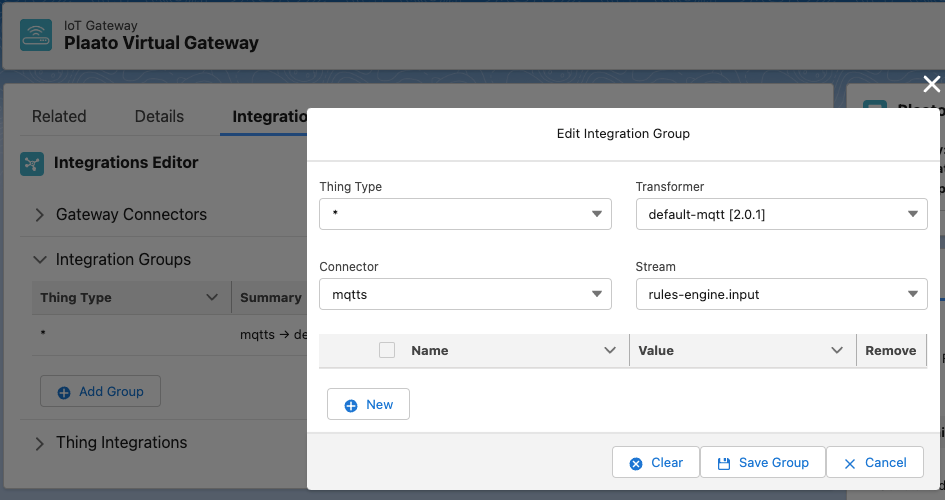
Integration Editor: Groups
NOTE
You’ll notice that by default a Default Integration Group is configured. For any standard MQTT Connector setup this does not need to be edited.Thing Integrations
Thing Integrations allow you to override a portion, or all, of the Integration Path for each registered Thing. For example, you may choose to select a specific Transformer for a Thing that needs debugging. Or you may need to specify unique parameters to the Connector for each Thing as seen below.
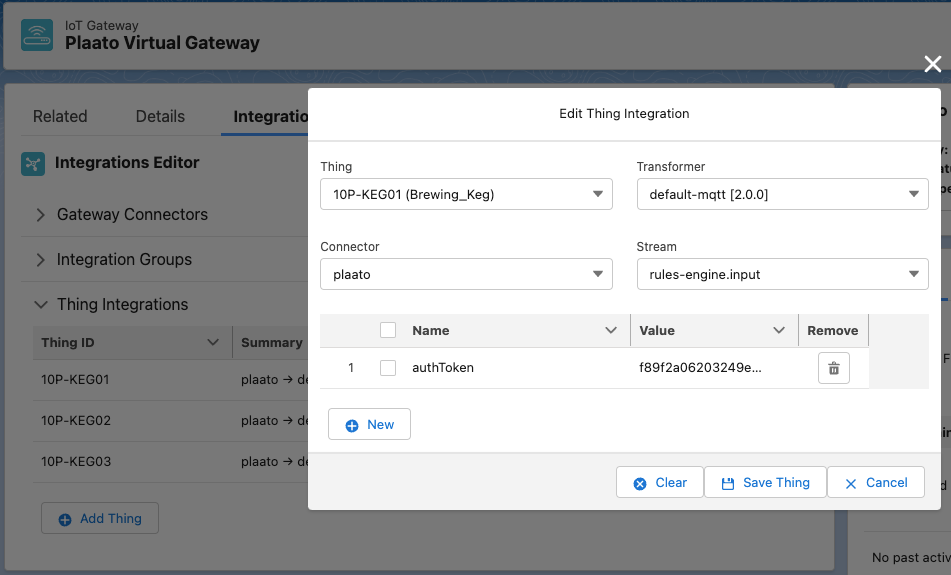
Integration Editor: Things
BEST PRACTICE
As Things are Registered to the Gateway they will automatically show up in this list, and do not need to be added manually.Gateway Management Console
The Console tab on a Gateway allows you to send/receive messages (IoT Commands) to the Gateway. The following catalog of out-of-the-box Command Templates is currently available:
- Clear Registration Cache
- Get Connector Status
- Get Device Cache (Thing)
- Get I/O Status
- Get Registration Cache (All)
- Get Registration Cache (Thing)
- Get ThingType Cache
- Restart Virtual Gateway
- Test Thing Data
- Reset ThingType Cache: Forces the Gateway Rules Engine to reload the ThingType
- Reset Registration Cache: Forces the Gateway Rules Engine to reload the Gateway’s & Thing’s Registration and Integrations
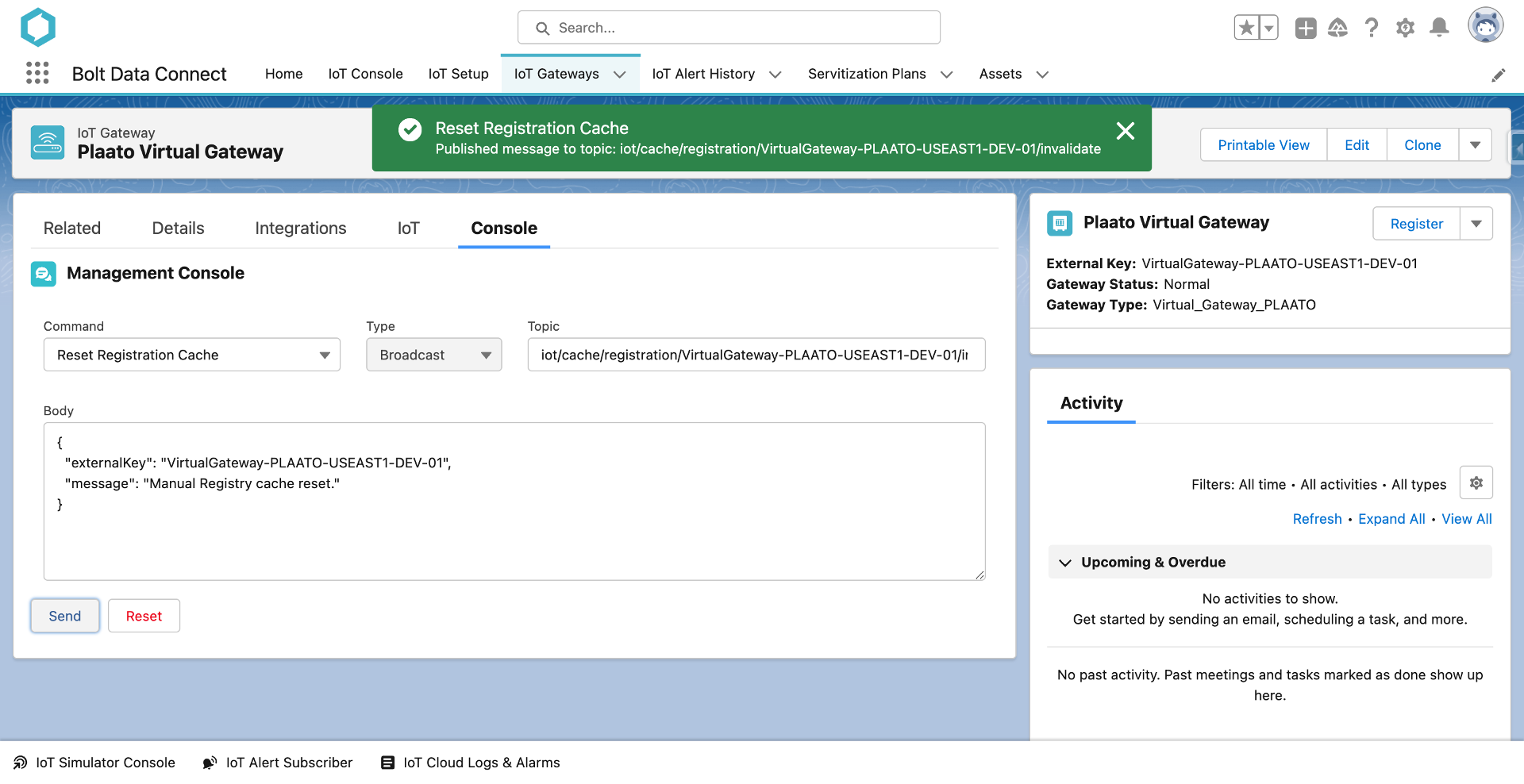
Gateway Management Console
Custom Commands
Select the CUSTOM command to use a freeform editor to send any custom command message to the Gateway.
Restart Gateway
-
Description: It restarts a gateway. It does not apply to an asset.
-
Type: Request-Reply
-
Topic:
// topic pattern: iot/gateway/+/command/+ iot/gateway/{gateway_id}/command/{command_name} // example iot/gateways/VirtualGateway-PLAATO-USEAST1-DEV-01/command/restart -
Body
// example
{
  "request_id": "ppate1690571776080"
}
Get Registeration Cache (All)
-
Description: It retrieves registeration caches of all assets and gateways
-
Type: Request-Reply
-
Topic:
// topic pattern: iot/gateway/+/command/+ iot/gateway/{gateway_id}/command/{command_name} // example iot/gateways/VirtualGateway-PLAATO-USEAST1-DEV-01/command/get-thing-cache -
Body
{
  "request_id": "ppate1690571863558"
}
Get Registeration Cache (Thing)
-
Description: It retrieves registeration cache of a specific thing. A thing could be gateway or asset.
-
Type: Request-Reply
-
Topic:
// topic pattern: iot/gateway/+/command/+ iot/gateway/{gateway_id}/command/{command_name} // example iot/gateways/VirtualGateway-PLAATO-USEAST1-DEV-01/command/get-cache-thingid -
Body
{
  "thing_id": "{thing_id}", // e.g., 10P-KEG01, VirtualGateway-PLAATO-USEAST1-DEV-01
  "request_id": "ppate1690572125580"
}
Clear Registeration Cache
-
Description: It clears registeration cache of a thing. A thing could be gateway or asset.
-
Type: Request-Reply
-
Topic:
// topic pattern: iot/gateway/+/command/+ iot/gateway/{gateway_id}/command/{command_name} // example iot/gateways/VirtualGateway-PLAATO-USEAST1-DEV-01/command/clear-cache -
Body
{
  "thing_id": "{thing_id}", //e.g., VirtualGateway-PLAATO-USEAST1-DEV-01, 10P-KEG01
  "request_id": "ppate1690572498198"
}
Get ThingType Cache
-
Description: It retrieves specification cache of a thing type.
-
Type: Request-Reply
-
Topic:
// topic pattern: iot/gateway/+/command/+ iot/gateway/{gateway_id}/command/{command_name} // example iot/gateways/VirtualGateway-PLAATO-USEAST1-DEV-01/command/get-spec-cache -
Body
{
  "thing_type": "{thing_type}", //e.g., Brewing_Keg, Virtual_Gateway_PLAATO
  "request_id": "ppate1690572761850"
}
Get IO Status
-
Description: It retrieves status of various IOs.
-
Type: Request-Reply
-
Topic:
// topic pattern: iot/gateway/+/command/+ iot/gateway/{gateway_id}/command/{command_name} // example iot/gateways/VirtualGateway-PLAATO-USEAST1-DEV-01/command/get-io-status -
Body
// example
{
  "request_id": "ppate1690573052355"
}
Get Connector Status
- Description: It retrieves status of all connectors attached to a gateway.
- Type: Request-Reply
- Topic:
  // topic pattern:
  iot/gateway/+/command/+
  iot/gateway/{gateway_id}/command/{command_name}

  //  example
  iot/gateways/VirtualGateway-PLAATO-USEAST1-DEV-01/command/get-connector-status
- Body
//example
{
  "request_id": "ppate1690573316704"
}
Get Device Cache
- Description: It retrieves cache of a device data
- Type : Request-Reply
- Topic:
  // topic pattern:
  iot/gateway/+/command/+
  iot/gateway/{gateway_id}/command/{command_name}

  //  example
  iot/gateways/VirtualGateway-PLAATO-USEAST1-DEV-01/command/get-device-cache
- Body
// example
  {
    "thing_id": {thing_id},
    "request_id": "ppate1690580697957"
  }
Test thing data
- Description: It lets your test your data. It inputs sample data of an asset/gateway and outputs processed data from rules-engine.
- Type: Request-Reply
- Topic:
// topic pattern:
iot/gateway/+/status/+
iot/gateway/{asset_id}/status/{request_id}

//  example
iot/gateways/VirtualGateway-PLAATO-USEAST1-DEV-01/command/test-thing-data
- Body
// example
{
  "externalKey": "{asset_id}", // e.g., 10P-KEG01
  "request_id": "ppate1690573756372",
  ... // add sensor data
}
Reset Registration Cache
- Description: It resets cache of an asset or an gateway.
- Type: Broadcast
- Topic:
// topic pattern
iot/cache/registration/{asset_id}/invalidate


// example
iot/cache/registration/10P-KEG01/invalidate
- Body
// example
{
  "externalKey": "{asset_id}", //e.g., 10P-KEG01
  "message": "Manual Registry cache reset."
}
Reset ThingType Cache
- Description: It resets cache of thingtype. A thingType could be a gateway or thing
- Type: Broadcast
- Topic:
// topic pattern
iot/cache/specification/{thing_type}/invalidate


// example
iot/cache/specification/Brewing_Keg/invalidate
- Body
// example
{
  "thingType": "{thing_type}", //e.g., Brewing_Keg
  "message": "Manual Registry cache reset."
}
MQTT Template
- Type
- The type of message (Broadcast, Request-Reply). NOTE: In the initial release only
Broadcastis supported. - Topic
- The MQTT Topic to publish the command to
- Body
- The JSON payload of the command
NOTE
This is especially useful if you are using a custom connector. This will allow you to publish a message to the Gateway, which will in-turn publish it to the connector itself. Use the following topic format for Connector commands:iot/gateways/{GATEWAY_ID}/connector/xxx