Servitization is the ability to use IoT data to drive “outcome as a service” for your customers. By setting up a Servitization Plan, with both Usage and Uptime based items, you can automatically generate invoices / quotes for customers based on their use of your IoT connected assets.
Servitization Setup
Visit the Servitization Setup help document to understand the settings which control how the Servitization job will generate Servitization Details and also control which output Objects will be created from the details.
Servitization Templates
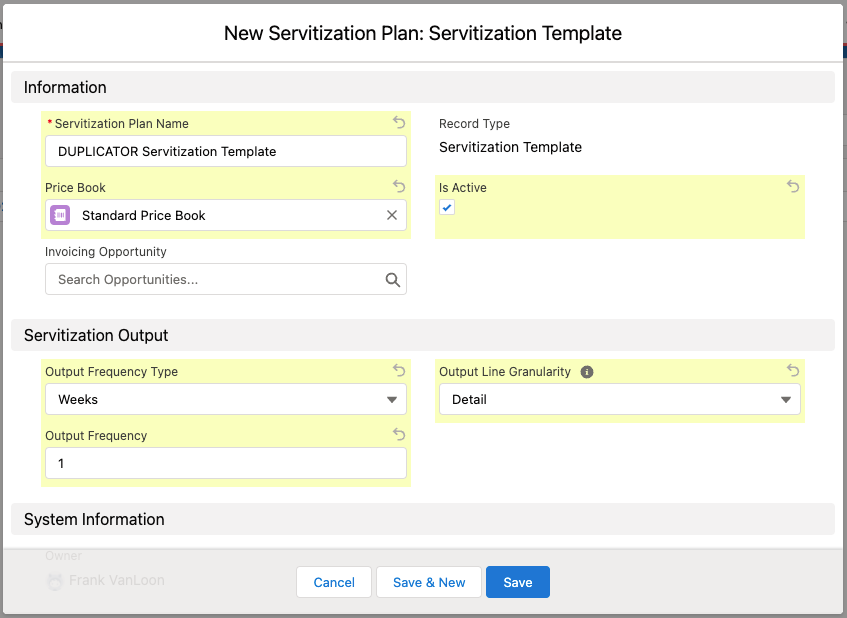
Templates are a special kind of Servitization Plan created to specify a reusable configuration of Servitization settings and Items.
New Servitization Template
Note
See below for details on specifying Servitization Items. They are the same for Plans or Templates.
Once a Servitization Template Plan is created, use the Create Plan action to create a copy of the plan / items for a specific Account, Dates & Covered Things.
Servitization Plans
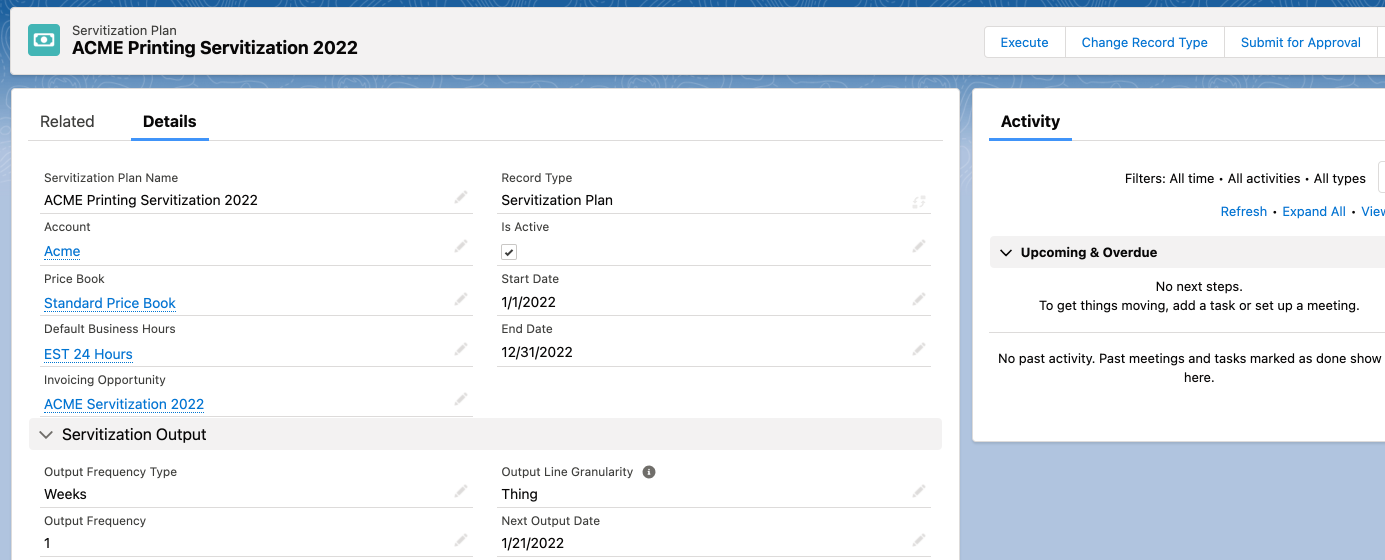
Servitization Plans specify the items & coverage for tracking the IoT driven “outcome as a service” for your customers. In other words, it defines the items you are intending to charge your customer for, as well as which of your connected assets are covered or included. Each Servitization Plan is specific to an Account & Pricebook, and in addition to the items & coverage it also specifies the frequency & granularity of the output details. This output typically correlates to an “Invoice” that will ultimately be sent to your customer on a regular interval. This output is dynamically mapped to any Salesforce Objects in the IoT Setup screens.
Servitization Plan
Price Book
Select the Pricebook that has includes the Servitization Products.
NOTE: These Products are not the same as the Asset’s product. They will be “usage” or “time” based.
Default Business Hours
Important for Uptime items, this lookup specifies the default Business Hours to use for calculating billable time.
Output Frequency / Type
These fields work together to specify how often an output object will be generated by the Servitization job.
Output Line Granularity
Affects how many output lines will be created, to control the granularity of detail provided to your customers in the output.
Product: Each Item / Product is a single line, with all details + things combined
Thing: Each Item / Product + Thing is a single line, with all details combined
Detail: Each Item / Product + Thing + Detail is a single line
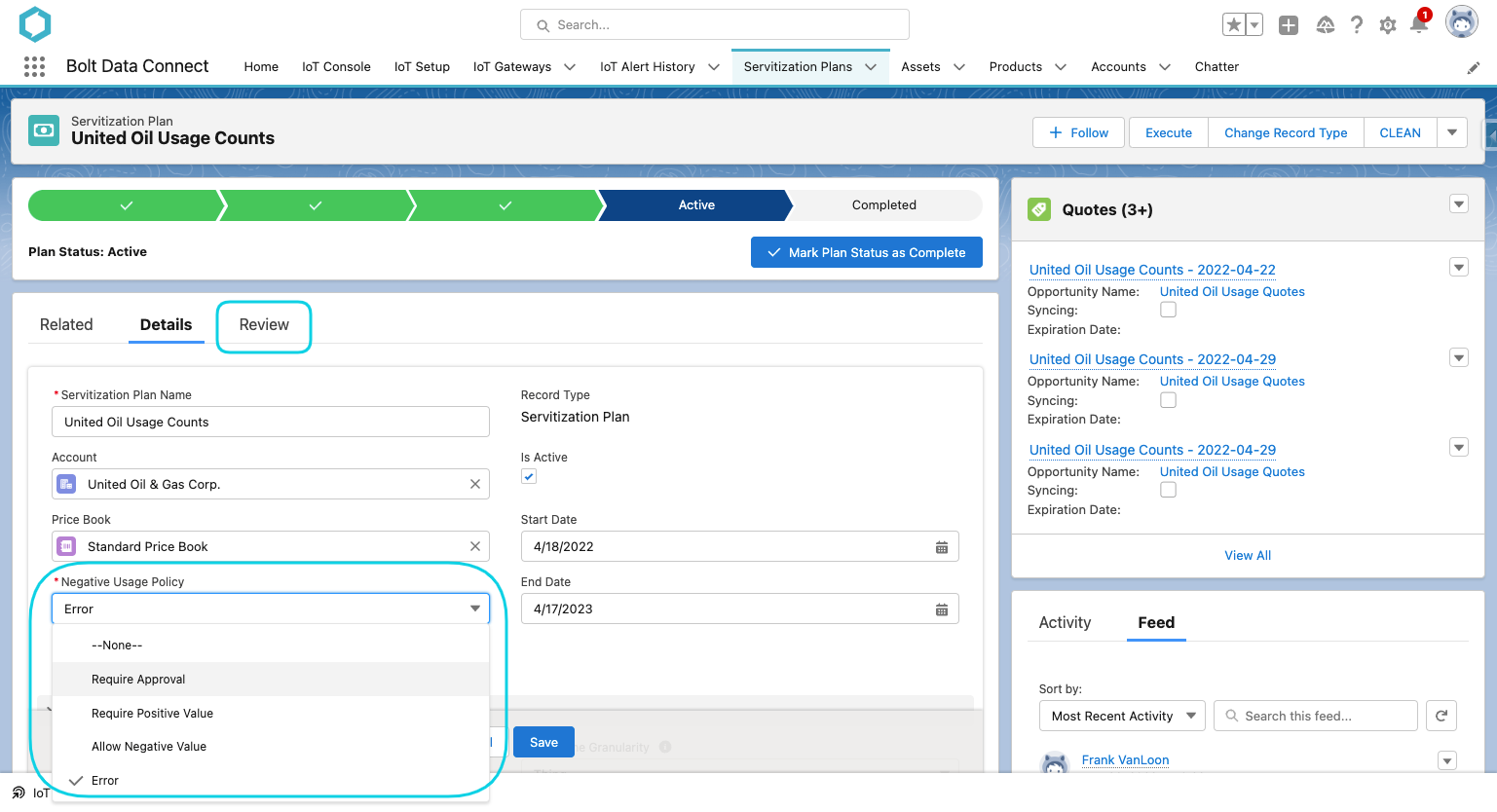
Negative Usage Policy
For Usage Based Items, if a negative change in value is detected this controls which of the following actions the system will automatically take:
Require Approval: The Detail will be flagged as “Needs Approval” and a User will need to approve or change Quantity to a positive value.
Require Positive Value: The Detail will be flagged as “Needs Approval” and a User will need to change Quantity to a positive value.
Allow Negative Value: Negative Values will be allowed.
Error: The Detail will not be processed, and an Error will be logged (either to Chatter or IoT Admin Logs). The Sensor Data should be corrected before re-running the job.
Servitization Plan
Embedded Pricing
Servitization Plans can be configured with all of the pricing embedded, without the need for a Pricebook.
Price Book
Leave the Price Book blank on the Servitization Plan
Item Base Price
Fill in the Base Price on each Servitization Item
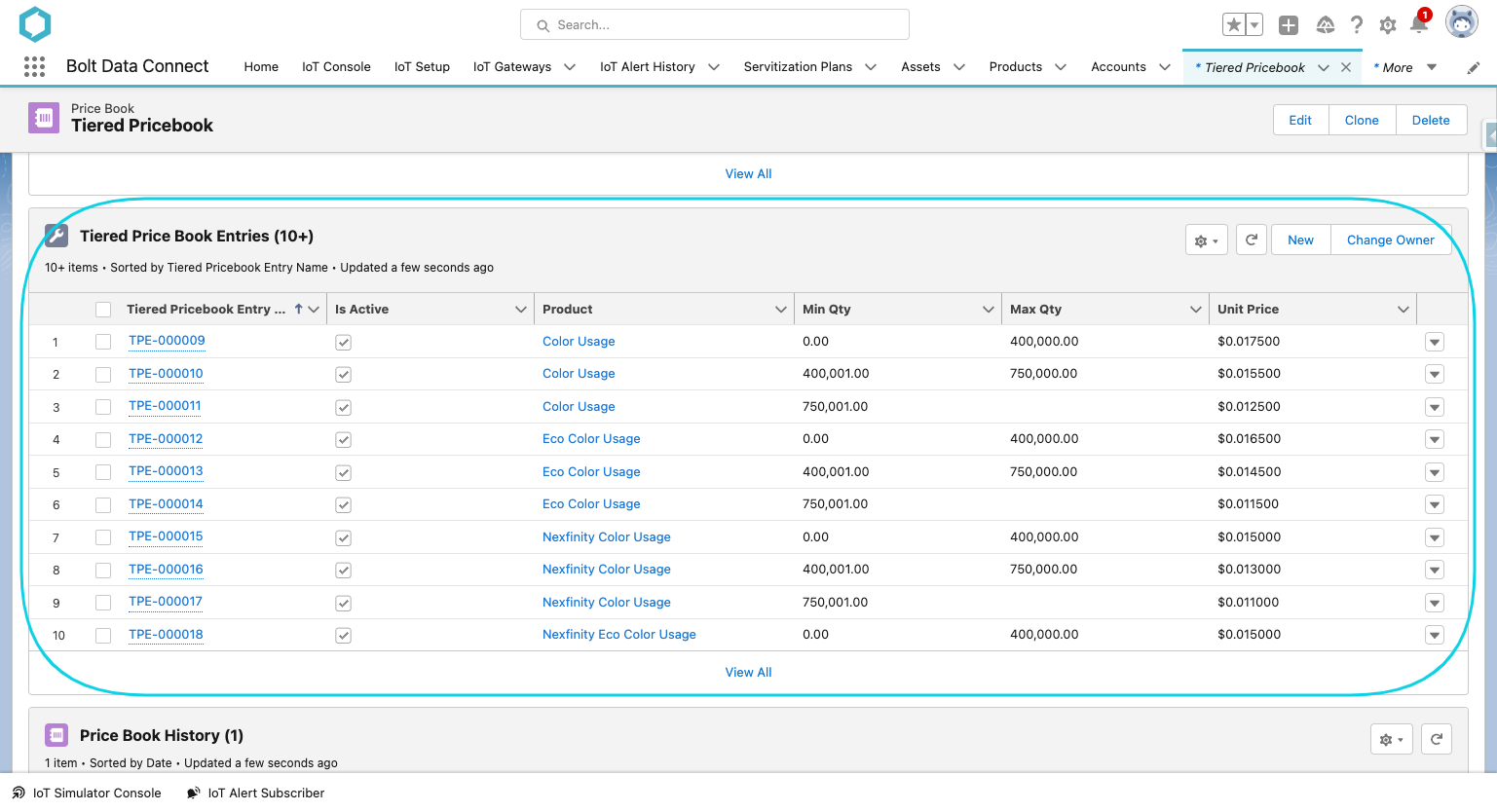
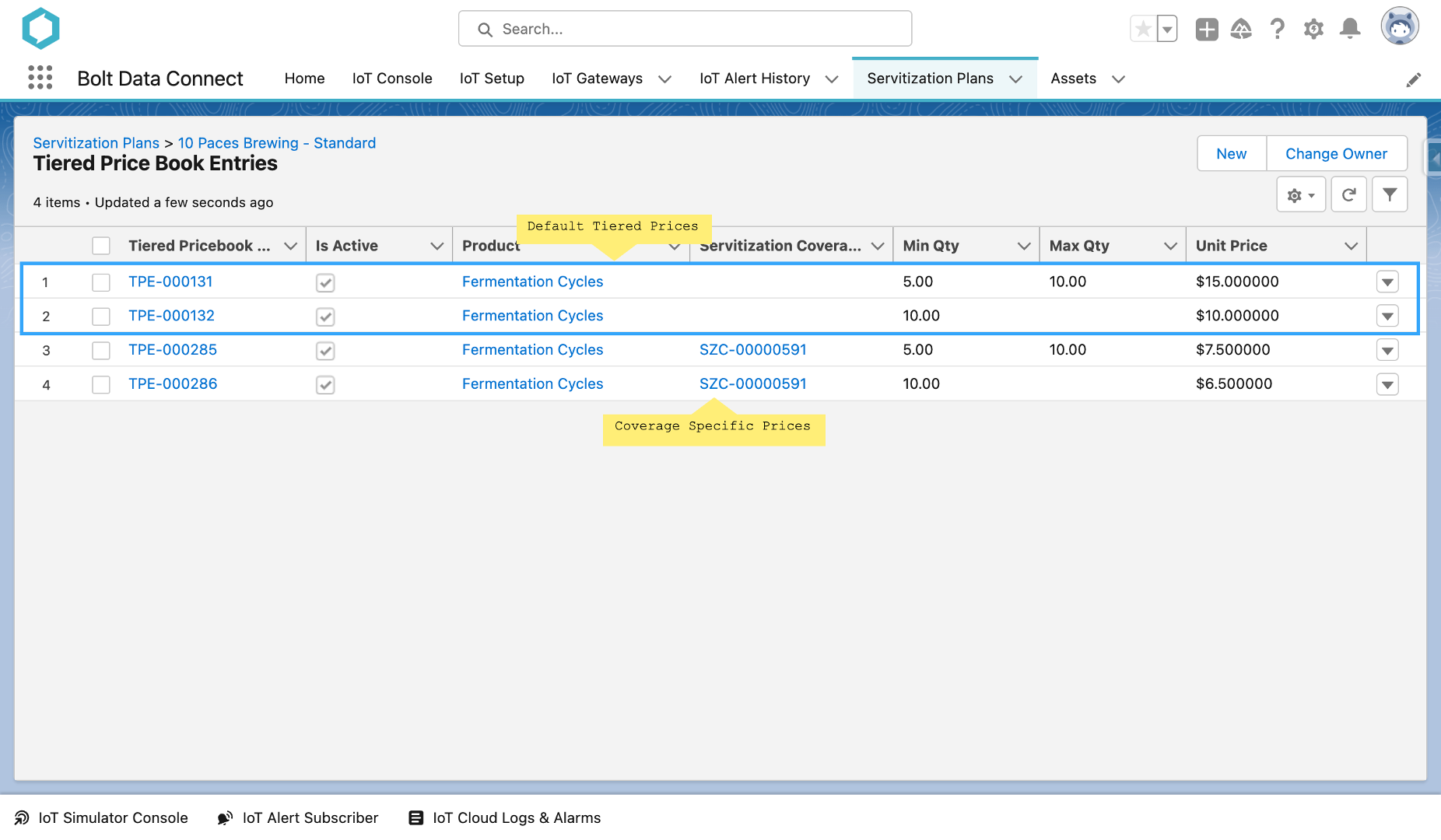
Tiered Price Book Entries
(OPTIONAL) Add Tiered Price Book Entries to the Servitization Plan related list
Tiered Pricing
These Embbeded Tiered Pricing records can also be specific to Coverage (Thing/Asset) by filling in the Coverage lookup field. This allows the Administrator to set prices specific to individual Coverage which override the default pricing.
Tiered Pricing with Coverage
Servitization Items
We currently support both Usage and Uptime based items. The following fields are common on both types of items:
Servitization Product
The product that defines the “outcome as a service” you are charging to your customers. This product must have a Price in the Price Book linked to the Servitization Plan.
Base Price
This field will be auto-populated from the Servitization Product / Price Book Entry if a Pricebook is assigned to the Plan. If no Pricebook is assigned, this field must be manually populated.
Qty Calculation
Used in conjuntion with the Per Qty field to calculate the Qty for Servitization Details.
EXACT: No rounding. The Qty will be the exact fraction as calculated by the actual measurement and Per Qty values.
ROUND-UP: Round the value up to the nearest whole Per Qty value.
ROUND-DOWN: Round the value down to the nearest whole Per Qty value.
Per Qty
The Quantity that each priced Servitization Product represents. (e.g. Uptime might be sold in 4 hour blocks, Usage might be sold in 100 count chunks)
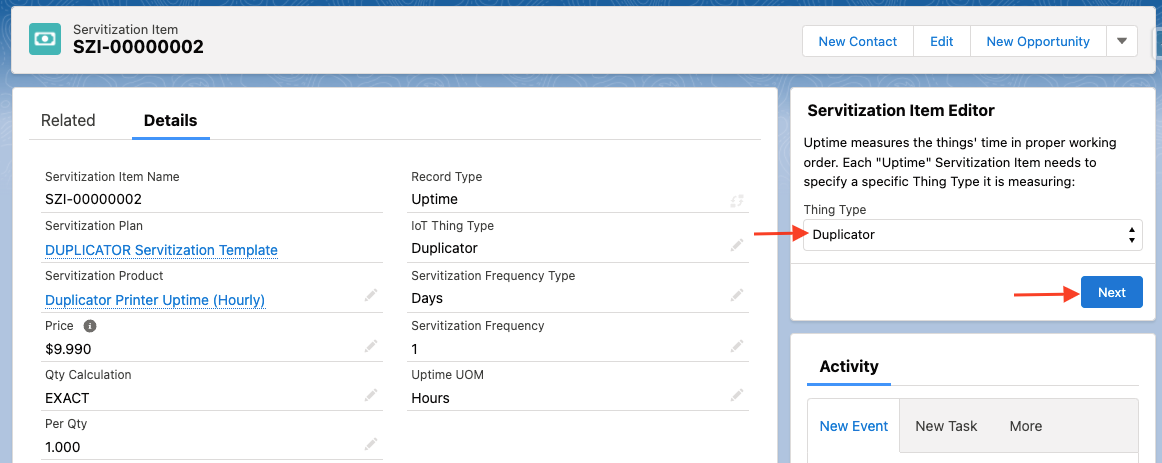
IoT Thing Type
Which Thing Type does this Servitization Item apply to?
NOTE: Use the Editor on the Servitization Item page to set this value after creation.
Servitization Frequency / Type
How often will Servitization Details be created for each Item for each Covered Thing.
Advanced Pricing
Skip $0 Output
Skips the Output line if the calculated line price is $0
Pricing Policy
Used to determine the calculated price for each Servitization Detail / Output line.
Base Price: Simply uses the “Base Price” field on the Servitization Item
Base Price with Overage: Uses the Item “Base Price” with a single Tiered Price Entry for Overage with a Min Qty (and blank Max Qty) and Price
Average Tier Pricing: Priced by Tier based on Averages of Total per Servitization Item
Per Tier Pricing: Individually Priced Lines for each Tiered Price (outputs lines for each Tier)
Single Tier Pricing: Single Output Line for Total Qty Tier Price
Total Tier Pricing: Priced by Tier based on Total per Servitization Item
Reconciliation Count
Number of Outputs to Reconcile together, before calculating a Tiered Price. (Default is 1)
Skip Delta Calculation
When checked, indicates that the IoT Value will be a delta (difference since last reading) and that the system should not calculate the difference but instead use this value in the Usage details.
Advanced Pricing
Uptime Items
Uptime items measure the time in which the IoT device was in good working order for the customer. We measure this by the amount of time the device was in “Normal” IoT Status (not “Offline” or “Alert”).
BUSINESS-HOURS
The default Business Hours on the Servitization Plan, or the specific Business Hours on the “Thing”, influence this greatly. Every Business Hours record is specific to a timezone so it is important to ensure this aligns to the device. In addition, if it is only 8 or 10 hours a day, that is the maximum billable hours in a day (as opposed to a 24 hour period). Keep this in mind and consider creating IoT specific Business Hours, instead of reusing your Field Service “Working Hours” possibly.
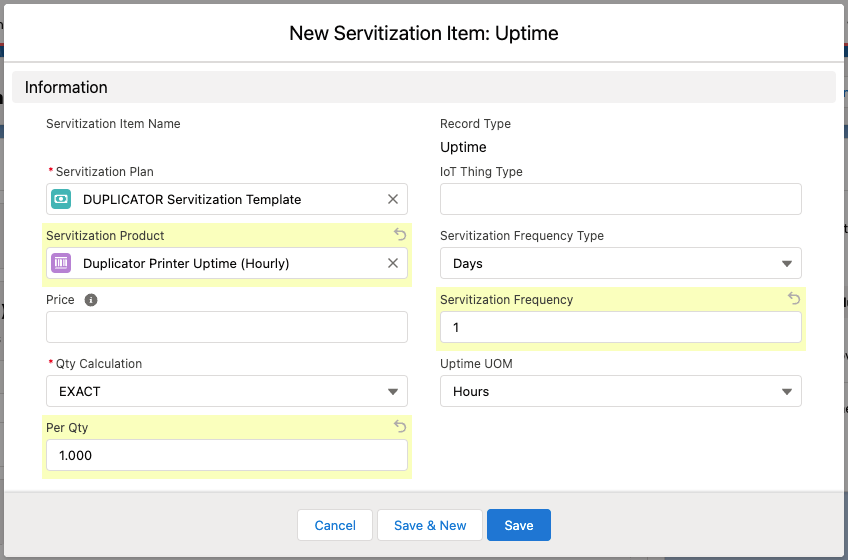
New Servitization Item: Uptime
In addition the fields above, Uptime Items must specify:
Uptime UOM
The Unit of Measure (UOM) to measure the Uptime.
Seconds
Minutes
Hours
Days
Edit Servitization Item: Uptime
Use the Servitization Item Editor to set the IoT Thing Type easily.
Usage Items
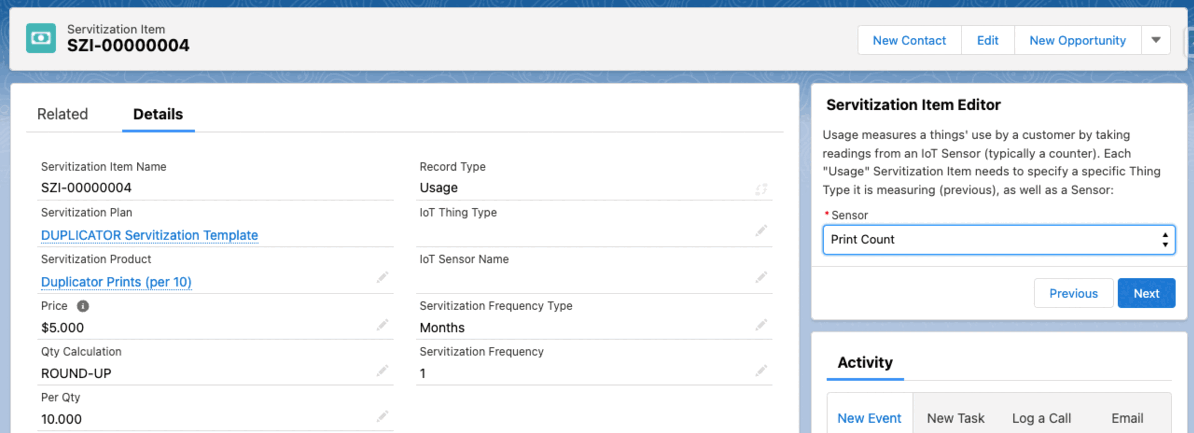
Usage items track & measure the value of a sensor on a specific kind of IoT device. These are typically a “counter” of some sort that tracks how many uses the customer has consumed.
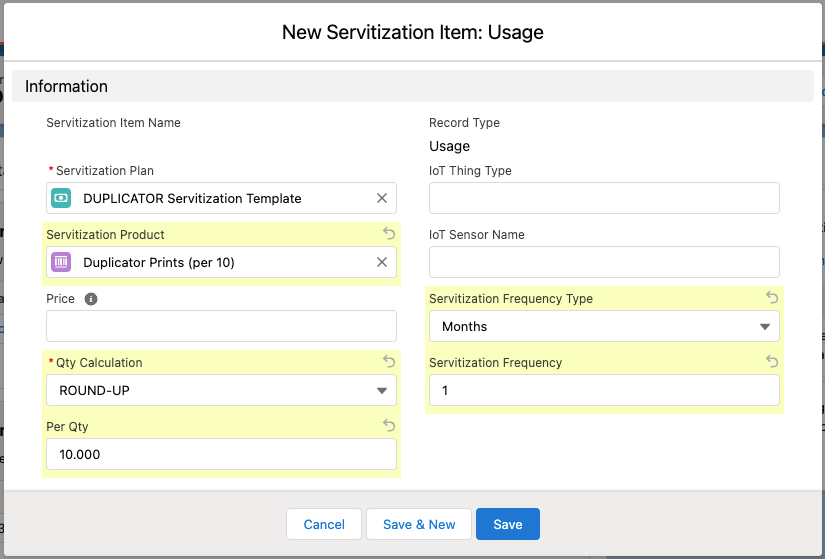
New Servitization Item: Usage
In addition the fields above, Uptime Items must specify:
IoT Sensor Name
The name of the configured sensor (from the Thing Type specification) to track/measure
NOTE: Use the Editor on the Servitization Item page to set this value after creation.
Edit Servitization Item: Usage
IoT Tier Sensor Name
(OPTIONAL) The name of the configured sensor (from the Thing Type specification) to determine which Tiered Pricing band to use. This is useful when a calculation or combination of fields determines the “tier”, but the individual values need to be billed at the tiered price.
NOTE: Use the Editor on the Servitization Item page to set this value after creation.
Use the Servitization Item Editor to set the IoT Thing Type, IoT Sensor Name and IoT Tier Sensor Name easily.
Servitization Coverage
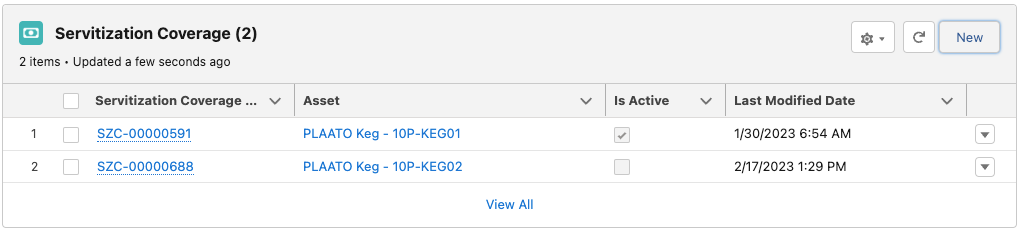
The coverage records denote which connected “Things” will be included in this Servitization Plan.
Servitization Coverage
Note
It’s important to add to this Coverage list as new IoT Things are Registered to ensure they’re included. Some customers have decided to automate this. In addition, the “Is Active” flag can be used to add Assets before activating them, and automating the activation on a specific date or event.
Servitization Details
The details records are auto-created by the scheduled Servitization Job. Each Servitization Item denotes the frequency and calculations used in creating these records.
Servitization Details
Servitization “Execute” / Output
The Servitization Setup screens specify what Output objects will be created. In addition, the Servitization Plan specifies the frequency that Output Objects are generated.
REMEMBER: This output typically correlates to an “Invoice” that will ultimately be sent to your customer on a regular interval.
Note
It’s recommended to add a Related List to the Servitization Plan of the Output Objects (e.g. Orders, Quotes, Proforma Invoices, etc.) for visibility and clarity.