State
Core Concepts
For more information on the core concepts surrounding the usage of state machines see State Machine Concepts.
State Machine Editor
In the 1.10 Release, a new State Machine Editor was introduced. With this editor, creating state machines is now even easier and all of the scripting below is generated by the GUI editor. See State Machine Editor. The following page is primarily useful only if you’re manually reviewing the state-machine created with the new editor.Conceptual Components Applied
Machines
Machines are created using core.state.createMachine(),
which returns a Machine Object. Refer to the
Machine Class Definition for more details on the available methods.
When referring to a machine in other calculations and alerts (e.g.
calculation.myStateMachine), the returned value will be the string
representation of the active state using dot-notation for the current active
hierarchy (e.g. 'B.A.B').
States
States are added to a Machine prior to initialization(). The encapsulate a set
of Actions and Transitions. The current active state can be accessed by
referencing the state-machine directly in other calculations and alerts (e.g.
calculation.myStateMachine).
Actions
Actions are be evaluated at state-entry, during-state-execution, and at state-exit. Actions define an arbitrary set of logic to be evaluated at the specified time.
For more information see:
.addEntryAction(stateName, action).addDuringAction(stateName, action).addExitAction(stateName, action)
The primary use-case for actions will likely be to update the state-machine’s
local variables. Every State-Action is passed 3 positional arguments when
evaluated: local, event, and state (see StateAction for
more details on the contents of these arguments).
Transitions
Transition conditions are evaluated at the start of each “step” while the
From-State is active. Transitions can be added between states with the
.addTransition(from, to, options)
function. Users can optionally define a condition in which to take the
transition. If a condition isn’t specified, the transition is automatically
taken on the “step” after the From-State becomes active. It is also possible to
define TransitionActions which are evaluated when a transition is evaluated,
however it is recommended to use StateActions unless TransitionAction is
the only way to satisfy the requirement.
Simple Applied Example
For this example, we’ll create the following state-machine:
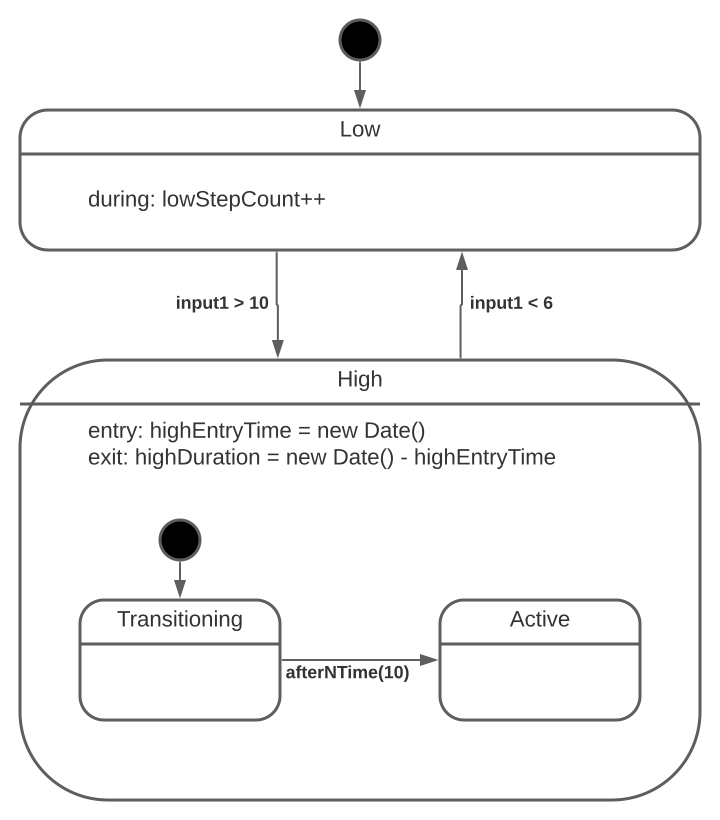
Simple State-Machine Example
The calculated field for the myStateMachineCalculation calculation:
// #region initialize
core.state
  .createMachine()
  .addState("High")
  .addState("Low", { initial: true })
  .addState("High.Transitioning", { initial: true })
  .addState("High.Active")
  .addTransition("High", "Low", {
    condition: (local, event, state) => local.input1 < 6,
  })
  .addTransition("Low", "High", {
    condition: (local, event, state) => local.input1 > 10,
  })
  .addTransition("High.Transitioning", "High.Active", {
    condition: (local, event, state) => after(local.transitionTimeSec, "sec"),
  })
  .addDuringAction("Low", (local, event, state) => local.lowStepCount++)
  .addEntryAction(
    "High",
    (local, event, state) => (local.highEntryTime = new Date())
  )
  .addExitAction(
    "High",
    (local, event, state) =>
      (local.highDuration =
        new Date().getTime() - local.highEntryTime.getTime())
  )
  .withLocal({
    transitionTimeSec: 10,
    input1: sensor.sensorA,
    input2: calculation.otherCalculation,
  })
  .initialize();
// #endregion initialize

// #region step
core.state.stepMachine({
  local: {
    input1: sensor.sensorA,
    input2: calculation.otherCalculation,
    otherMachineState: calculation.otherMachine, // this will be the string-value of the active state in the "otherMachine" state-machine
    otherMachineInternalVariable: core.state.getLocal(
      "otherMachine",
      "otherMachineInternalVariable"
    ),
  },
});
// #endregion step
withLocalis used to set any local variables which may be required during initialization or isn’t updated duringstepMachine.
- Example 1: the machine has an Action on an initial transition which reads a local variable
withLocal.- Example 2: the machine has local variables which are “constant” and aren’t updated as part of
stepMachine.
The internal variable highDuration can be accessed in other calculations / alerts by using the following:
core.state.getLocal("myStateMachineCalculation", "highDuration");
Available Functions
createMachine()
Create a new state machine.
This machine is created using the name of the calculation to which it is assigned to (e.g. if
calculation.myStateMachine = core.state.createMachine() ..., the machine will be namedmyStateMachine, seecore.state.getLocal)
Usage
core.machine.createMachine();
Arguments
None
stepMachine(options)
Step the machine using the options provided.
Usage
core.state.stepMachine({
  local: {
    variableA: 1,
    variableB: sensor.sensorA,
  },
  event: {
    timestamp: new Date("2021-09-07T19:20:24.611Z"),
    type: "MY_SUPER_EVENT",
  },
});
Arguments
- options
- [dictionary] dictionary with the following fields:
- local: [dictionary] key:values to update the machine local variables
- event: [Event] an event definition for event-driven state-machines
getLocal(machine, variable)
Retrieve data from the local variables of a state-machine.
Usage
core.state.getLocal("myStateMachine", "variableA");
Arguments
- machine
- [string] the name of the machine to fetch data from (i.e. the calculation name)
- variable
- [string] the name of the local variable to fetch
Available Condition Functions
after(count, unit)
Evaluates to true after the specified time since the current state has been activated.
Usage
.addTransition('from', 'to', {condition: (local, event, state) => after(10, 'sec')})
Arguments
- count
- [number] the number of units to wait before returning
true - unit
- [‘min’ | ‘sec’ | ‘msec’] (default: ‘sec’) the time-unit of
count
afterEvent(count, unit, event)
Evaluates to true after the specified time since the specified event was last received.
Usage
.addTransition('from', 'to', {condition: (local, event, state) => afterEvent(10, 'sec', 'MY_EVENT_NAME')})
Arguments
- count
- [number] the number of units to wait before returning
true - unit
- [‘min’ | ‘sec’ | ‘msec’] (default: ‘sec’) the time-unit of
count - event
- [string] the name of the event to trigger on
Available Classes
Machine
The primary state-machine class used to track and manage a given state machine.
Usage
const myMachine = new Machine(name, options);
Arguments
- name
- [string] the name of the state-machine
- options
- [dictionary] with the following fields:
- parallel [boolean] if the top-level states are parallel states (default: false)
- currentTime [Date] the initial time used within the machine
Machine.withLocal(variables)
Fully override the state-machine’s local variables with that provided.
Usage
myMachine.withLocal({
  variableA: 1,
  variableB: 2,
});
Arguments
- variables
- [dictionary] key:values to update the machine local variables
Machine.setLocal(variables)
Override specific keys within a state-machine’s local variables.
Usage
myMachine.setLocal({
  variableA: 3,
});
Arguments
- variables
- [dictionary] key:values to update the machine local variables
Machine.addState(name, options)
Add a state to the state-machine.
Usage
myMachine
  .addState("State1", { initial: true })
  .addState("State1.ChildA", {
    initial: true,
    initialTransitionActions: (local, event, state) => {
      local.variableA = 0;
    },
  })
  .addState("State1.ChildB");
Arguments
- name
- [string] the fully qualified name of the state (using dot-notation (
.) for nested states) options - [dictionary] dictionary with the following fields:
- initial: [boolean] determines if the state is the initial when it’s parent becomes active (from inactive)
- initialTransitionActions: [TransitionAction | Array<TransitionAction>] the action(s) to execute when the initial-transition is taken
Machine.addEntryAction(stateName, action)
Machine.addDuringAction(stateName, action)
Machine.addExitAction(stateName, action)
Machine.addTransition(from, to, options)
Add a transition to the state-machine.
Usage
myMachine.addTransition("State1.ChildA", "State1.ChildB", {
  condition: (local, event, state) => event.type === "MY_SUPER_EVENT",
});
Arguments
- from
- [string] the fully qualified name of the from-state
- to
- [string] the fully qualified name of the to-state
- options
- [dictionary] dictionary with the following fields:
- condition: [Condition] The condition on which to take the transition
- actions: [TransitionAction | Array<TransitionAction>] the action(s) to execute when the initial-transition is taken
- priority: [number] the order in which this transition-condition is evaluated with respect to all transitions out of the active state
Machine.initialize()
Initialize a state-machine.
Usage
myMachine.initialize();
Arguments
None
Available Types
StateAction
A callable function to evaluate during one of the 3 execution phases of a state.
Interface
(local, event, state) => Promise<void> | void
Arguments
- local
- the current local-variables of the state-machine are passed into this positional argument at evaluation
- event
- the active event (if any) of the state-machine is passed into this positional argument at evaluation
- state
- [dictionary] with the following fields:
- stepCount: [number] represents the total steps taken since the entry of into the active state
- entryTime: [Date] represents the machine-time in which the state was activated
- currentTime: [Date] represents the current machine-time
- events: [dictionary] key:values with keys representing all events which have occurred during the current state and their EventStats
TransitionAction
A callable function to evaluate during the execution of the transition.
Interface
(local, event) => Promise<void> | void
Arguments
- local
- the current local-variables of the state-machine are passed into this positional argument at evaluation
- event
- the active event (if any) of the state-machine is passed into this positional argument at evaluation
Condition
A callable function to evaluate to determine if a condition is true or false.
Interface
(local, event, state) => Promise<boolean> | boolean;
Arguments
same as StateAction
Event
An interface defining a Machine Event
Interface
interface Event {
  timestamp: Date;
  type: string;
}
EventStats
An interface defining statistics of a given Event
Interface
interface Event {
  latestTimestamp: Date;
  count: number;
}