Sensor Data
Sensor data typically lives solely in the IoT Cloud. We realize there are some workflows which required importing data into Saleforce Objects. For such workflows, we enable a Sensor Data Sync which pulls the latest sensor data from the IoT Cloud into the Object you specify in IoT Setup.
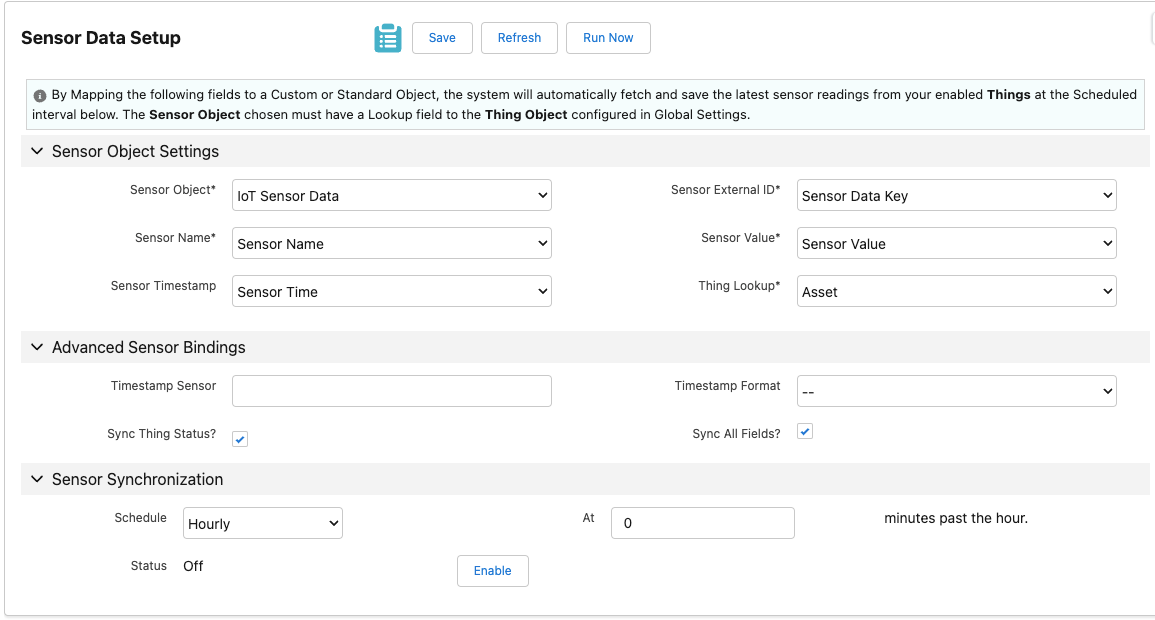
Sensor Data Settings
Field Definitions
- Sensor Object
- This field defines the Object to pull data into.
- The Object must have at least 4 fields to tie to:
External ID,Sensor Name,Sensor Value, andThing Lookup. - Sensor External ID
- The field to hold the External ID of the sensor data object.
- Sensor Name
- The field to hold the name of the sensor data.
- Sensor Value
- The field to hold the value of the sensor data.
- Sensor Timestamp
- The field to hold the timestamp of the sensor data.
- Thing Lookup
- The field to hold the Lookup to the related Thing Object.
Asset Attributes
Asset Attributes is a new Standard Object used in Salesforce Field Service and Manufacturing Cloud in Usage-Based and Condition-Based PM Plans. We’ve added support for populating these objects automatically by synchronizing the values from the IoT Cloud as well as automating the creation of the Asset Attribute Definitions.
Asset attributes provide a better understanding of the condition of assets and let mobile workers repair and maintain those assets in the field more efficiently. An asset usually has multiple attributes. You can create attributes by defining the values and data types of attribute definitions and associating them with the asset attributes.
- Ability to easily sync and populate Asset Attributes with clicks-not-code
- Full automation of Asset Attribute Definitions, reducing manual setup tasks
- Ability to filter which Sensors / Calculated Fields / Alert Conditions are sync’d to better support the Asset Attributes data limits
- Asset attribute support in Servitization Plans
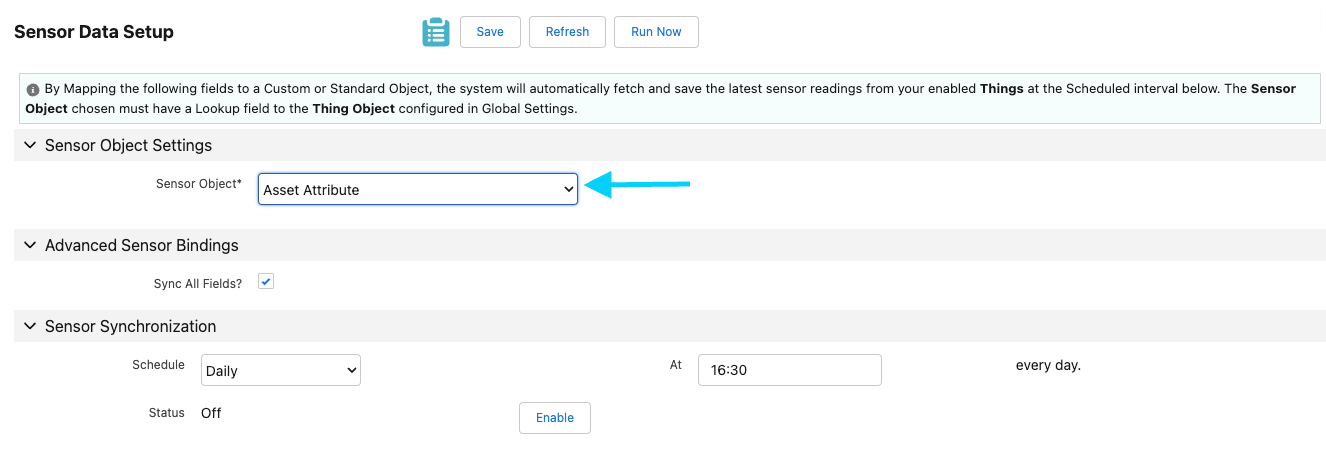
Sensor Data Asset Attributes
Note
- 25 Attributes per Asset limit
- Asset Attribute is a “External Object”, and not allowed to have Custom Fields
- Due to being an External Object, No “Timestamp” Field is available, only the “Last Modified”. This impacts the Servitization ability to bill accurately.
- We Auto-Create Attribute Definitions by Field Name & Data Type (Sensor/CalcField/AlertCondition) - so these names to be be unique or consistent across all of the configured Thing Types
- See Asset Attributes Limitations for full details
Advanced Sensor Bindings
A sensor value can be used as the “Timestamp” of the synchronized Sensor Data. This Timestamp influences downstream processes like Servitization and Reporting. If these fields are NOT filled in, the system will use the default Timestamp in our IoT metadata which indicates the date/time when we received the IoT message.
- Timestamp Sensor
- The name of the Sensor (or Calculated Field) to use as the Timestamp of all Sensor Data values
- Timestamp Format
- The format of the above Timestamp Sensor. Choices are: GMT, Local, Epoch. If using GMT or Local the value should be an ISO formatted date-time, whereas Epoch should be in milliseconds.
- Sync Thing Status
- Indicator of whether or not to Sync the Thing Status (Normal/Alert/Offline) from the IoT Cloud to Salesforce.
- Sync All Fields
- Indicator of whether or not to Sync All Fields from the IoT Cloud to Salesforce. If unselected, an editor will be displayed to select which IoT Fields to synchronize, including helper buttons to select all, servitized values only, or sensors only.
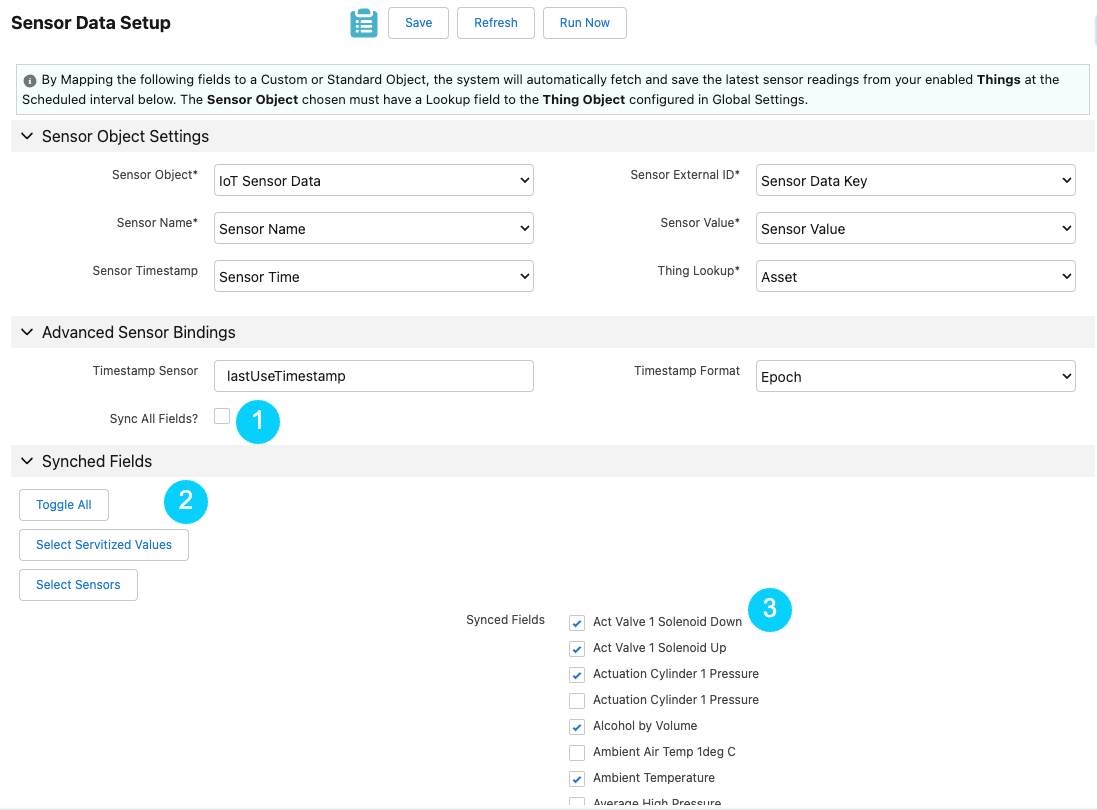
Sensor Data Asset Attributes
Sensor Synchronization
The sync schedule for the Sensor Data is managed in the lower section of the Sensor Data settings page.
- If an existing schedule has already been configured, select Disable prior to configuring a new schedule.
- In the Schedule drop-down menu, select the desired frequency.
- Enter the appropriate value in the At field
- Hourly: Define how many minutes past the hour to run the sync.
- Daily: Define the time of day.
- Weekly: Define the day of the week and time of day.
- Monthly: Define which day of the month and the time of day.
- Select Enable.
FYI
Thechron expression is shown in the Status field.