Thing Object
Configure which Object in your Org to use as the IoT Thing.
- From the Bolt Data Connect App (if you’re not already there, follow the Launching the App section in the App Tour), go to the IoT Setup tab.
- Select Global Settings.
- In the Thing Object Settings section of the Global Settings page, select the Salesforce Object in the Thing Object field.
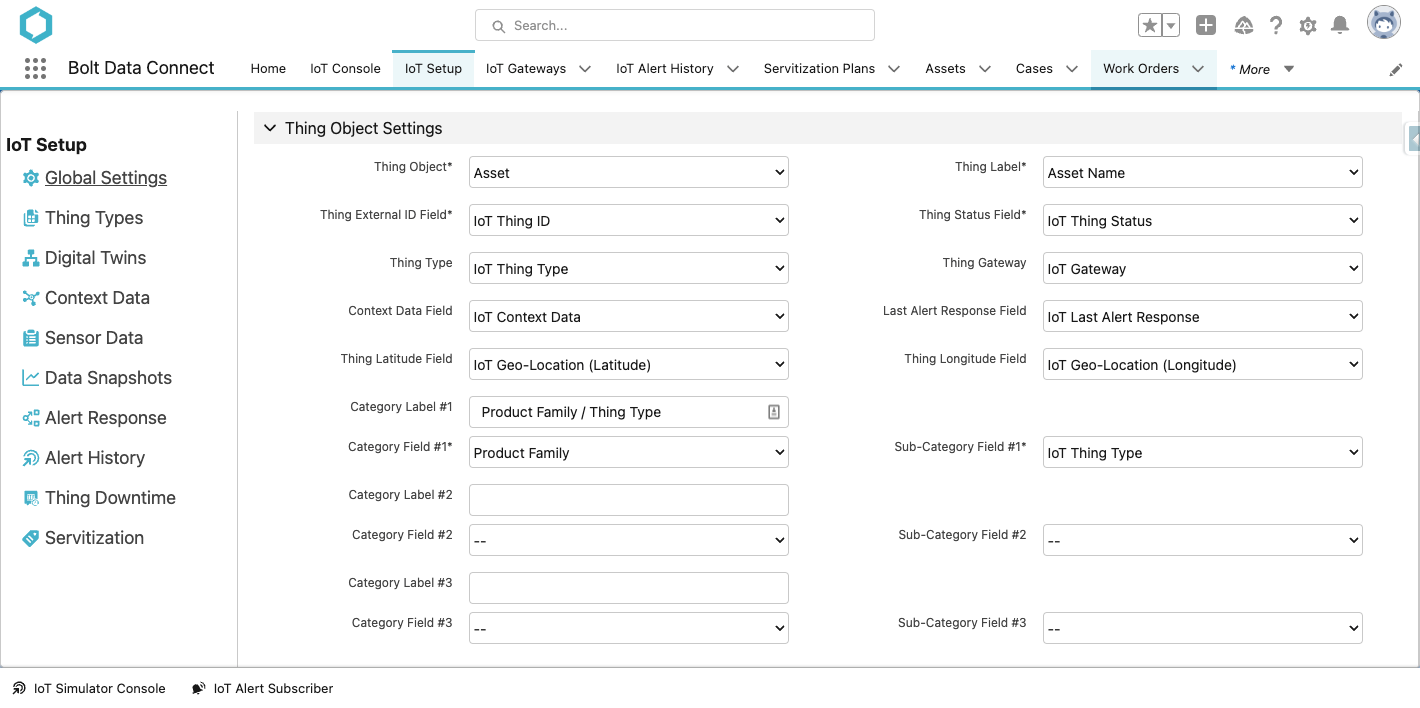
Global Settings - Thing Object Settings
Field Definitions
Once you select an Object you can decide which Salesforce fields to bind to the following:
- Thing Label
- This field is used as the label in the IoT Console Views.
- Thing External ID Field
- This field is used as the primary key for data operations on a Thing (it’s how the data is indexed and must be unique within your Org).
Heads up
This field is the most important, as it allows your Thing’s data to be organized and accessed properly. Without this field, your Things’ data will just exist in the IoT Cloud and will be inaccessible from Salesforce.- Thing Status Field
- This field is used in the IoT Console Navigation Pane and IoT Console Views.
- Thing Type
- This field is used as the identifier for which Thing-Type to assume for the given Thing. If a Thing has an undefined Thing Type, every message will be sent to the Cloud, unaggregated, and no Alerts will be provided (other than the built-in Offline Alert). For cost management purposes, it is highly recommended, that every Thing be assigned a Thing Type.
- Thing Gateway
- This field is used to determine which gateway will receive and manage your Things data. Without this field, your Thing’s data will not be aggregated or stored (i.e. your Thing won’t have anyone to talk to and its data will be lost). Must be a Lookup(IoT Gateway) field.
- Context Data Field
- This behind the scenes field will track the status of the context data syncing. Must be a Long Text Area field.
- Last Alert Response Field
- This behind the scenes field will track the most recent Alert Response and it’s results. Must be a Text field.
- Thing Latitude/Longitude Fields
- These fields are used to plot each Thing on the Map View in the IoT Console. Must be either two separate numeric fields, or a single Geo-Location field.
- Category Labels/Fields
- These fields determine the top-level navigation nodes in the IoT Console Navigation Pane Category Mode.
- Sub-Category Fields
- These fields determine the second-level navigation node in the IoT Console Navigation Pane Category Mode.
Last modified November 8, 2023: Absolute Image paths for all-content (7aa8323)